
If you are not able to fill in "preferredLanguage" via a default method, you can use the “switch” expression to exchange a finite list of elements to languages. For example, you could use the country or a specific address and exchange it for our language codes (see list below for the correct language codes).
To make this work, you need a list that tells the system which element should be exchanged with which language value.
Please follow the steps below:
-
Go to Microsoft Entra ID Attribute Mapping
-
Then add a new attribute
-
Fill in the fields as follows and click on "Save"
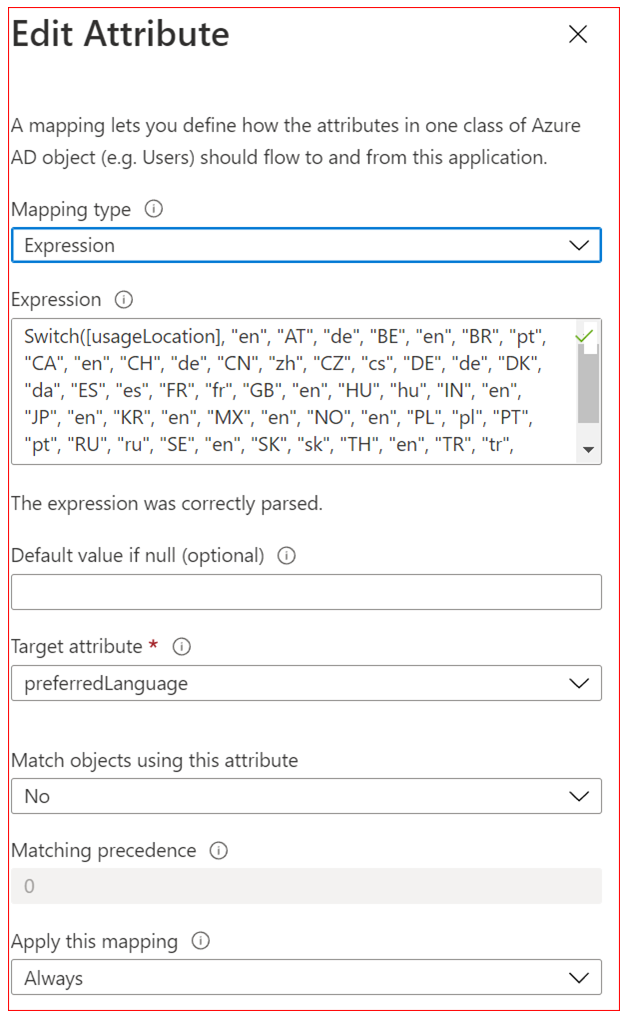
Detailed explanation:
Mapping Type: Expression
Expression: Switch([Sourceattribute], "DefaultValue", "Source1", "Target1", "Source2", "Target2", [...])
Sourceattribute: attribute that is maintained throughout (country, postal code, usageLocation, etc.)
DefaultValue: default value for any attribute not mentioned in the list (recommended: de or en)
Source1: first item to be exchanged (e.g., AT; DE; UK etc)
Target1: first exchange (e.g., de, en etc.)
Source2: second item to be exchanged
Target2: second exchange
Target attribute: should be preferredLanguage
All users with source entries that are not featured in the list will receive the default value.
Note:
The expression is case sensitive, meaning it distinguishes between uppercase and lowercase letters. For example, if you use "DE" and "de", you must specify both versions in the function ("DE", "de" and "de", "de").
You can bypass case sensitivity by using the ToUpper() or ToLower() function.
Example: Switch(ToLower([SourceAttribute], "DefaultValue", "Source1", "Target1", … )
Microsoft limits this list to 100 values.
For more information about the Switch expression, see this Microsoft article.
Microsoft article for further information:
https://learn.microsoft.com/en-us/entra/identity/app-provisioning/functions-for-customizing-application-data#switch
What language syntax do we accept?
We accept ISO 639-1 language codes. The combinations like de-DE and en-US with ISO-639 and ISO-3166 also work.
Full list of acceptable language codes:
-
ar: 'Arabic'
-
zh: 'Chinese'
-
de: 'German'
-
en: 'English'
-
es: 'Spanish'
-
fr: 'French'
-
it: 'Italian'
-
nl: 'Dutch'
-
pl: 'Polish'
-
pt: 'Portuguese'
-
ru: 'Russian'
-
sv: 'Swedish' (se is deprecated)
-
tr: 'Turkish'
-
ja: 'Japanese' (jp is deprecated)
-
da: 'Danish'
-
cs: 'Czech'
-
hu: 'Hungarian'
-
ro: 'Romanian'
-
sk: 'Slovak'
-
fi: 'Finnish'
-
et: 'Estonian'
-
el: 'Greek'
-
no: 'Norwegian'
-
bg: 'Bulgarian'
-
vi: 'Vietnamese'
-
sl: 'Slovenian'
-
hr: 'Croatian'
-
ko: 'Korean'
-
hi: 'Hindi'
-
th: 'Thai'
-
uk: 'Ukrainian'
-
sr : ‘Serbian’
-
ca: ‘Catalan’
Please keep in mind
Accepting that data is not the same as supporting all languages in the list (in terms of content).